Web Configurator
Overview
This part introduces the configuration and functions of the Web Configurator.
The Web Configurator is an HTML-based management interface that allows easy system setup and management through Internet browser. Use a browser that supports HTML5, such as Microsoft Edge, Mozilla Firefox, or Google Chrome. The recommended minimum screen resolution is 1024 by 768 pixels.
In order to use the Web Configurator you need to allow:
• Web browser pop-up windows from your device.
• JavaScript (enabled by default).
• Java permissions (enabled by default).
System Login
1 Make sure your PoE12-3PD hardware is properly connected, and your computer is connected to the PoE12-3PD through a wired connection. See the Quick Start Guide.
2 Enter the PoE12-3PD’s DHCP-assigned IP address or https://192.168.1.1 in the browser. If your PoE12-3PD is in cloud mode, check the NCC’s Site-wide > Devices > Accessories screen for the PoE12-3PD’s LAN IP address.
Login Page: Standalone Mode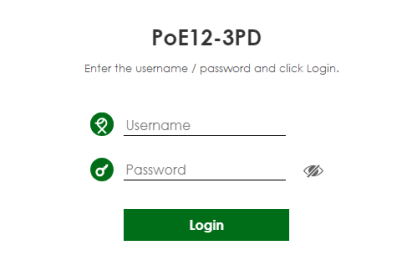
Login Page: Cloud Mode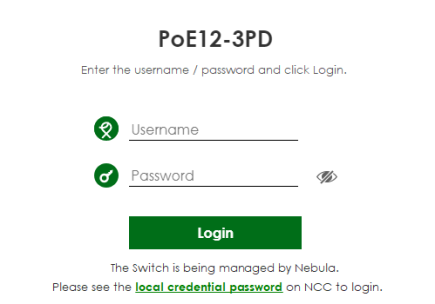
3 Enter the user name (default: admin) and password (default: 1234). Click Login.
If your PoE12-3PD is being managed or has been managed by the NCC, check Local credentials password in the NCC's Site-wide > Configure > Site settings screen for the PoE12-3PD's current password.
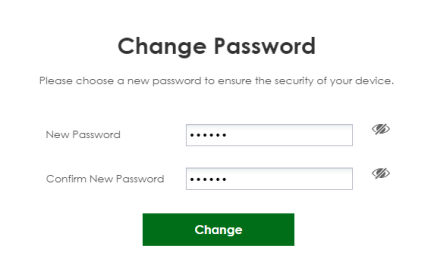
4 The following screen displays if you log into the PoE12-3PD for the first time. Enter a new password using the keyboard characters (except [ ? ], [ | ], [ ' ], [ " ], [ , ] or [ space ]). The password must be 4 to 63 characters long. Retype it to confirm and click Change to go to the login page and log in with your new password.
Login Page: Password Change