Loop Guard
Loop Guard Overview
This chapter shows you how to configure the Switch to guard against loops on the edge of your network.
Loop guard allows you to configure the Switch to shut down a port if it detects that packets sent out on that port loop back to the Switch. While you can use Spanning Tree Protocol (STP) to prevent loops in the core of your network. STP cannot prevent loops that occur on the edge of your network.
Loop Guard vs. STP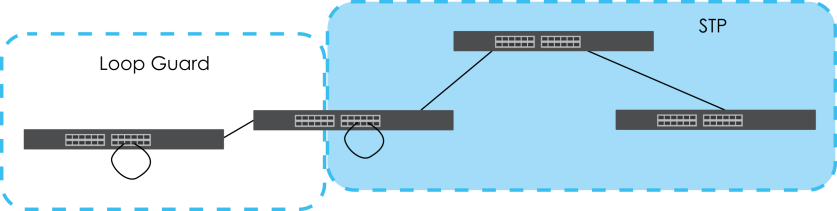
Refer to What You Need to Know for more information.
What You Can Do
Use the Loop Guard screen (Loop Guard Setup) to enable loop guard on the Switch and in specific ports.
What You Need to Know
Loop guard is designed to handle loop problems on the edge of your network. This can occur when a port is connected to a Switch that is in a loop state. Loop state occurs as a result of human error. It happens when two ports on a switch are connected with the same cable. When a switch in loop state sends out broadcast messages the messages loop back to the switch and are re-broadcast again and again causing a broadcast storm.
If a switch (not in loop state) connects to a switch in loop state, then it will be affected by the switch in loop state in the following way:
• The switch (not in loop state) will receive broadcast messages sent out from the switch in loop state.
• The switch (not in loop state) will receive its own broadcast messages that it sends out as they loop back. It will then re-broadcast those messages again.
The following figure shows port N on switch A connected to switch B. Switch B has two ports, x and y, mistakenly connected to each other. It forms a loop. When broadcast or multicast packets leave port N and reach switch B, they are sent back to port N on A as they are rebroadcast from B.
Switch in Loop State
The loop guard feature checks to see if a loop guard enabled port is connected to a Switch in loop state. This is accomplished by periodically sending a probe packet and seeing if the packet returns on the same port. If this is the case, the Switch will shut down the port connected to the switch in loop state.
Loop guard can be enabled on both Ethernet ports. The following figure shows a loop guard enabled port N on switch A sending a probe packet P to switch B. Since switch B is in loop state, the probe packet P returns to port N on A. The Switch then shuts down port N to ensure that the rest of the network is not affected by the switch in loop state.
Loop Guard – Probe Packet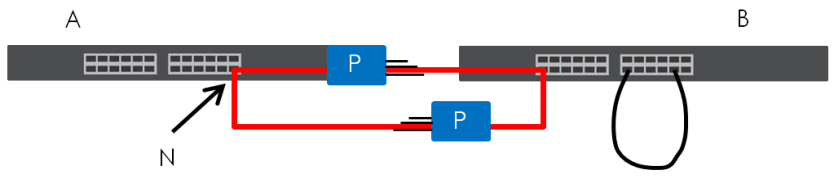
The Switch also shuts down port N if the probe packet returns to switch A on any other port. In other words loop guard also protects against standard network loops.
The following figure illustrates three switches forming a loop. A sample path of the loop guard probe packet is also shown. In this example, the probe packet is sent from port N and returns on another port. As long as loop guard is enabled on port N. The Switch will shut down port N if it detects that the probe packet has returned to the Switch.
Loop Guard – Network Loop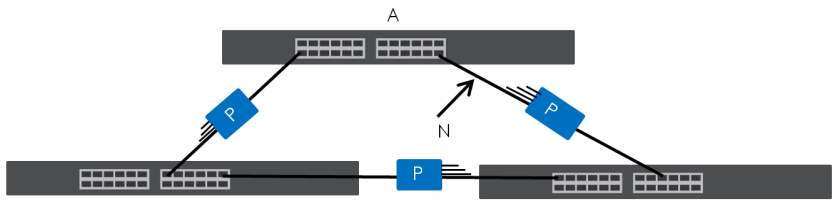
 After resolving the loop problem on your network you can re-activate the disabled port through the Web Configurator.
Loop Guard Setup
Click SWITCHING > Loop Guard in the navigation panel to display the screen as shown.
The loop guard feature cannot be enabled on the ports that have Spanning Tree Protocol (RSTP or MSTP) enabled.SWITCHING > Loop Guard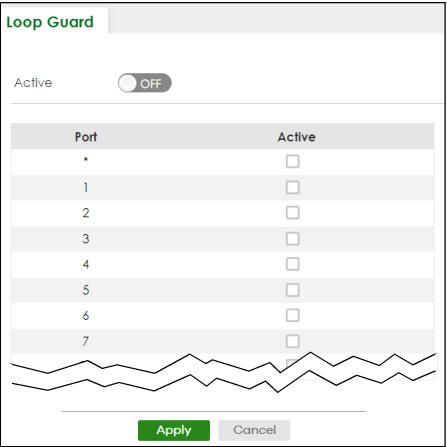
The following table describes the labels in this screen.
label | description |
|---|---|
Active | Enable the switch button to activate loop guard function on the Switch. The Switch generates syslog, internal log messages as well as SNMP traps when it shuts down a port through the loop guard feature. |
Port | This field displays the port number. |
* | Settings in this row apply to all ports. Use this row only if you want to make some settings the same for all ports. Use this row first to set the common settings and then make adjustments on a port-by-port basis. Changes in this row are copied to all the ports as soon as you make them. |
Active | Select this checkbox to enable the loop guard feature on this port. The Switch sends broadcast and multicast probe packets from this port to check if the switch it is connected to is in loop state. If the switch that this port is connected is in loop state the Switch will shut down this port. Clear this checkbox to disable the loop guard feature. |
Apply | Click Apply to save your changes to the Switch’s run-time memory. The Switch loses these changes if it is turned off or loses power, so use the Save link on the top navigation panel to save your changes to the non-volatile memory when you are done configuring. |
Cancel | Click Cancel to begin configuring this screen afresh. |