PPPoE
PPPoE Intermediate Agent Overview
This chapter describes how the Switch gives a PPPoE termination server additional information that the server can use to identify and authenticate a PPPoE client.
A PPPoE Intermediate Agent (PPPoE IA) is deployed between a PPPoE server and PPPoE clients. It helps the PPPoE server identify and authenticate clients by adding subscriber line specific information to PPPoE discovery packets from clients on a per-port or per-port-per-VLAN basis before forwarding them to the PPPoE server.

What You Can Do
• Use the PPPoE Intermediate Agent screen (PPPoE Intermediate Agent) to enable the PPPoE Intermediate Agent on the Switch.
• Use the PPPoE IA Port screen (PPPoE IA Port) to set the port state and configure PPPoE intermediate agent sub-options on a per-port basis.
• Use the PPPoE IA Port VLAN screen (PPPoE IA Port VLAN) to configure PPPoE IA settings that apply to a specific VLAN on a port.
What You Need to Know
Read on for concepts on ARP that can help you configure the screen in this chapter.
PPPoE Intermediate Agent Tag Format
If the PPPoE Intermediate Agent is enabled, the Switch adds a vendor-specific tag to PADI (PPPoE Active Discovery Initialization) and PADR (PPPoE Active Discovery Request) packets from PPPoE clients.
This tag is defined in RFC 2516 and has the following format for this feature.
Tag_Type (0x0105) | Tag_Len | Value | i1 | i2 |
The Tag_Type is 0x0105 for vendor-specific tags, as defined in RFC 2516. The Tag_Len indicates the length of Value, i1 and i2. The Value is the 32-bit number 0x00000DE9, which stands for the “ADSL Forum” IANA entry. i1 and i2 are PPPoE intermediate agent sub-options, which contain additional information about the PPPoE client.
Sub-Option Format
There are two types of sub-option: “Agent Circuit ID Sub-option” and “Agent Remote ID Sub-option”. They have the following formats.
SubOpt | Length | Value |
0x01 (1 byte) | N (1 byte) | String (63 bytes) |
SubOpt | Length | Value |
0x02 (1 byte) | N (1 byte) | MAC Address or String (63 bytes) |
The 1 in the first field identifies this as an Agent Circuit ID sub-option and 2 identifies this as an Agent Remote ID sub-option. The next field specifies the length of the field. The Switch takes the Circuit ID string you manually configure for a VLAN on a port as the highest priority and the Circuit ID string for a port as the second priority. In addition, the Switch puts the PPPoE client’s MAC address into the Agent Remote ID Sub-option if you do not specify any user-defined string.
Flexible Circuit ID Syntax with Identifier String and Variables
If you do not configure a Circuit ID string for a VLAN on a specific port or for a specific port, the Switch adds the user-defined identifier string and variables into the Agent Circuit ID Sub-option. The variables can be the slot ID of the PPPoE client, the port number of the PPPoE client and/or the VLAN ID on the PPPoE packet.
The identifier-string, slot ID, port number and VLAN ID are separated from each other by a pound key (#), semi-colon (;), period (.), comma (,), forward slash (/) or space. An Agent Circuit ID Sub-option example is “Switch/07/0123” and indicates the PPPoE packets come from a PPPoE client which is connected to the Switch’s port 7 and belong to VLAN 123.
SubOpt | Length | Value | ||||||
0x01 (1 byte) | N (1 byte) | Identifier String (53 byte) | delimiter (1 byte) | Slot ID (1 byte) | delimiter (1 byte) | Port No (2 byte) | delimiter (1 byte) | VLAN ID (4 bytes) |
WT-101 Default Circuit ID Syntax
If you do not configure a Circuit ID string for a specific VLAN on a port or for a specific port, and disable the flexible Circuit ID syntax in the PPPoE > Intermediate Agent screen, the Switch automatically generates a Circuit ID string according to the default Circuit ID syntax which is defined in the DSL Forum Working Text (WT)-101. The default access node identifier is the host name of the PPPoE intermediate agent and the eth indicates “Ethernet”.
SubOpt | Length | Value | ||||||||
0x01 (1 byte) | N (1 byte) | Access Node Identifier (20 byte) | Space (1 byte) | eth (3 byte) | Space (1 byte) | Slot ID (1 byte) | / (1 byte) | Port No (2 byte) | : (1 byte) | VLAN ID (4 bytes) |
Port State
Every port is either a trusted port or an untrusted port for the PPPoE intermediate agent. This setting is independent of the trusted or untrusted setting for DHCP snooping or ARP inspection. You can also specify the agent sub-options (circuit ID and remote ID) that the Switch adds to PADI and PADR packets from PPPoE clients.
Trusted ports are connected to PPPoE servers.
• If a PADO (PPPoE Active Discovery Offer), PADS (PPPoE Active Discovery Session-confirmation), or PADT (PPPoE Active Discovery Terminate) packet is sent from a PPPoE server and received on a trusted port, the Switch forwards it to all other ports.
• If a PADI or PADR packet is sent from a PPPoE client but received on a trusted port, the Switch forwards it to other trusted ports.
 The Switch will drop all PPPoE discovery packets if you enable the PPPoE intermediate agent and there are no trusted ports.
Untrusted ports are connected to subscribers.
• If a PADI, PADR, or PADT packet is sent from a PPPoE client and received on an untrusted port, the Switch adds a vendor-specific tag to the packet and then forwards it to the trusted ports.
• The Switch discards PADO and PADS packets which are sent from a PPPoE server but received on an untrusted port.
PPPoE Intermediate Agent
Use this screen to configure the Switch to give a PPPoE termination server additional subscriber information that the server can use to identify and authenticate a PPPoE client.
Click SWITCHING > PPPoE Intermediate Agent to display the screen as shown.
SWITCHING > PPPoE Intermediate Agent > PPPoE Intermediate Agent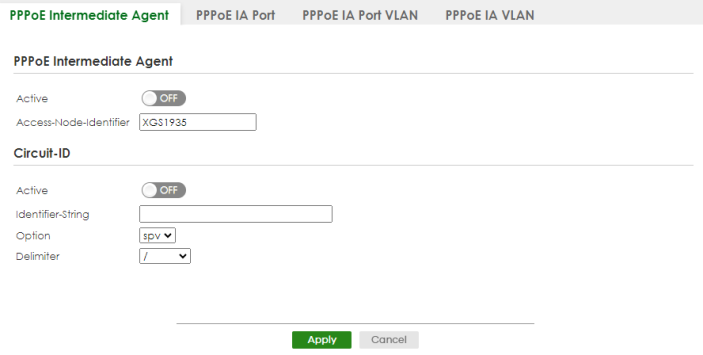
The following table describes the labels in this screen.
label | description |
|---|---|
PPPoE Intermediate Agent | |
Active | Enable the switch button to enable the PPPoE intermediate agent globally on the Switch. |
Access-Node-Identifier | Enter up to 20 ASCII printable characters (except [ ? ], [ | ], [ ' ], [ " ], or [ , ]) to identify the PPPoE intermediate agent. Hyphens (-) and spaces are also allowed. The default is the Switch’s host name. |
Circuit-ID Use this section to configure the Circuit ID field in the PADI and PADR packets. The Circuit ID you configure for a specific port (in the SWITCHING > PPPoE Intermediate Agent > PPPoE IA Port screen) or for a specific VLAN on a port (in the SWITCHING > PPPoE Intermediate Agent > PPPoE IA Port VLAN screen) has priority over this. That means, if you also want to configure PPPoE IA Per-Port or Per-Port Per-VLAN setting, leave the fields here empty and configure circuit-id and remote-id in the Per-Port or Per-Port Per-VLAN screen. | |
Active | Enable the switch button to have the Switch add the user-defined identifier string and variables (specified in the Option field) to PADI or PADR packets from PPPoE clients. If you leave this option unselected and do not configure any Circuit ID string (using CLI commands) on the Switch, the Switch will use the string specified in the Access-Node-Identifier field. |
Identifier-String | Specify a string that the Switch adds in the Agent Circuit ID sub-option. You can enter up to 53 printable ASCII characters (except [ ? ], [ | ], [ ' ], [ " ], or [ , ]). Spaces are allowed. |
Option | Select the variables that you want the Switch to generate and add in the Agent Circuit ID sub-option. The variable options include sp, sv, pv and spv which indicate combinations of slot-port, slot-VLAN, port-VLAN and slot-port-VLAN respectively. The Switch enters a zero into the PADI and PADR packets for the slot value. |
Delimiter | Select a delimiter to separate the identifier-string, slot ID, port number and/or VLAN ID from each other. You can use a pound key (#), semi-colon (;), period (.), comma (,), forward slash (/) or space. |
Apply | Click Apply to save your changes to the Switch’s run-time memory. The Switch loses these changes if it is turned off or loses power, so use the Save link on the top navigation panel to save your changes to the non-volatile memory when you are done configuring. |
Cancel | Click Cancel to begin configuring this screen afresh. |
PPPoE IA Port
Use this screen to specify whether individual ports are trusted or untrusted ports and have the Switch add extra information to PPPoE discovery packets from PPPoE clients on a per-port basis.
The Switch will drop all PPPoE packets if you enable the PPPoE Intermediate Agent on the Switch and there are no trusted ports.Click the SWITCHING > PPPoE Intermediate Agent > PPPoE IA Port screen to display the screen as shown.
SWITCHING > PPPoE Intermediate Agent > PPPoE IA Port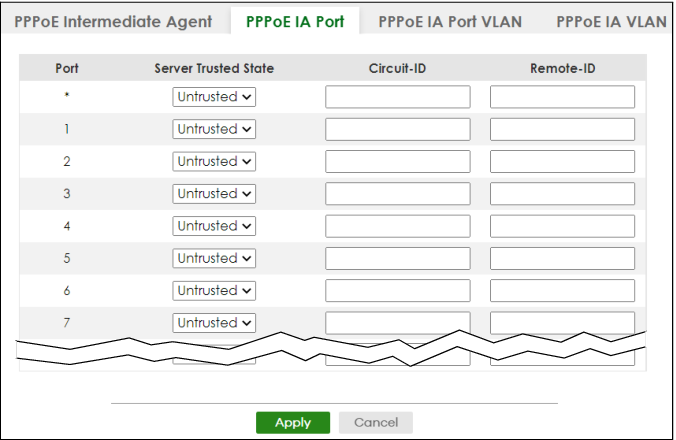
The following table describes the labels in this screen.
label | description |
|---|---|
Port | This field displays the port number. * means all ports. |
* | Use this row to make the setting the same for all ports. Use this row first and then make adjustments on a port-by-port basis. Changes in this row are copied to all the ports as soon as you make them. |
Server Trusted State | Select whether this port is a trusted port (Trusted) or an untrusted port (Untrusted). Trusted ports are uplink ports connected to PPPoE servers. If a PADO (PPPoE Active Discovery Offer), PADS (PPPoE Active Discovery Session-confirmation), or PADT (PPPoE Active Discovery Terminate) packet is sent from a PPPoE server and received on a trusted port, the Switch forwards it to all other ports. If a PADI or PADR packet is sent from a PPPoE client but received on a trusted port, the Switch forwards it to other trusted ports. Untrusted ports are downlink ports connected to subscribers. If a PADI, PADR, or PADT packet is sent from a PPPoE client and received on an untrusted port, the Switch adds a vendor-specific tag to the packet and then forwards it to the trusted ports. The Switch discards PADO and PADS packets which are sent from a PPPoE server but received on an untrusted port. |
Circuit-ID | Enter a string of up to 63 ASCII characters (except [ ? ], [ | ], [ ' ], [ " ], or [ , ]) that the Switch adds into the Agent Circuit ID sub-option for PPPoE discovery packets received on this port. Spaces are allowed. The Circuit ID you configure for a specific VLAN on a port (in the SWITCHING > PPPoE Intermediate Agent > PPPoE IA Port VLAN screen) has the highest priority. |
Remote-ID | Enter a string of up to 63 ASCII characters (except [ ? ], [ | ], [ ' ], [ " ], or [ , ]) that the Switch adds into the Agent Remote ID sub-option for PPPoE discovery packets received on this port. Spaces are allowed. If you do not specify a string here or in the Remote-ID field for a VLAN on a port, the Switch automatically uses the PPPoE client’s MAC address. The Remote ID you configure for a specific VLAN on a port (in the SWITCHING > PPPoE Intermediate Agent > PPPoE IA Port VLAN screen) has the highest priority. |
Apply | Click Apply to save your changes to the Switch’s run-time memory. The Switch loses these changes if it is turned off or loses power, so use the Save link on the top navigation panel to save your changes to the non-volatile memory when you are done configuring. |
Cancel | Click Cancel to begin configuring this screen afresh. |
PPPoE IA Port VLAN
Use this screen to configure PPPoE IA settings that apply to a specific VLAN on a port.
Click SWITCHING > PPPoE Intermediate Agent > PPPoE IA Port VLAN to display the screen as shown.
SWITCHING > PPPoE Intermediate Agent > PPPoE IA Port VLAN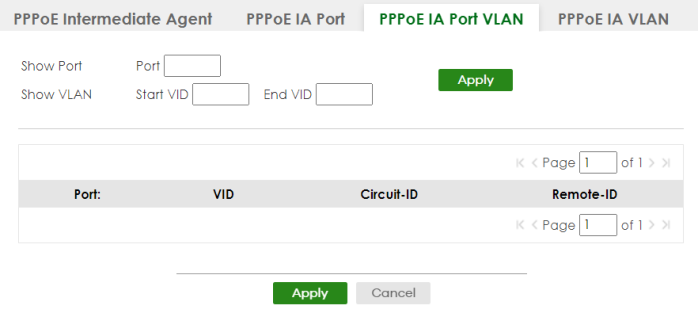
The following table describes the labels in this screen.
label | description |
|---|---|
Show Port | |
Port | Enter a port number to show the PPPoE Intermediate Agent settings for the specified VLANs on the port. |
Show VLAN Use this section to specify the VLANs you want to configure in the section below. | |
Start VID | Enter the lowest VLAN ID you want to configure in the section below. |
End VID | Enter the highest VLAN ID you want to configure in the section below. |
Apply | Click Apply to display the specified range of VLANs in the section below. |
Port: | This field displays the port number specified above. |
VID | This field displays the VLAN ID of each VLAN in the range specified above. If you configure the * VLAN, the settings are applied to all VLANs. |
* | Use this row to make the setting the same for all VLANs. Use this row first and then make adjustments on a VLAN-by-VLAN basis. Changes in this row are copied to all the VLANs as soon as you make them. |
Circuit-ID | Enter a string of up to 63 ASCII characters (except [ ? ], [ | ], [ ' ], [ " ], or [ , ]) that the Switch adds into the Agent Circuit ID sub-option for this VLAN on the specified port. Spaces are allowed. The Circuit ID you configure here has the highest priority. |
Remote-ID | Enter a string of up to 63 ASCII characters (except [ ? ], [ | ], [ ' ], [ " ], or [ , ]) that the Switch adds into the Agent Remote ID sub-option for this VLAN on the specified port. Spaces are allowed. If you do not specify a string here or in the Remote-ID field for a specific port, the Switch automatically uses the PPPoE client’s MAC address. The Remote ID you configure here has the highest priority. |
Apply | Click Apply to save your changes to the Switch’s run-time memory. The Switch loses these changes if it is turned off or loses power, so use the Save link on the top navigation panel to save your changes to the non-volatile memory when you are done configuring. |
Cancel | Click Cancel to begin configuring this screen afresh. |
PPPoE IA VLAN
Use this screen to set whether the PPPoE Intermediate Agent is enabled on a VLAN and whether the Switch appends the Circuit ID and/or Remote ID to PPPoE discovery packets from a specific VLAN.
Click SWITCHING > PPPoE Intermediate Agent > PPPoE IA VLAN to display the screen as shown.
SWITCHING > PPPoE Intermediate Agent > PPPoE IA VLAN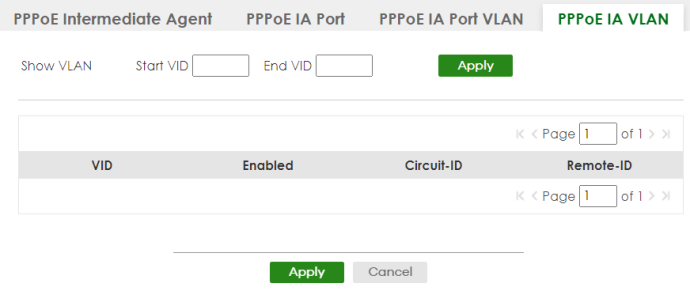
The following table describes the labels in this screen.
label | description |
|---|---|
Show VLAN Use this section to specify the VLANs you want to configure in the section below. | |
Start VID | Enter the lowest VLAN ID you want to configure in the section below. |
End VID | Enter the highest VLAN ID you want to configure in the section below. |
Apply | Click Apply to display the specified range of VLANs in the section below. |
VID | This field displays the VLAN ID of each VLAN in the range specified above. If you configure the * VLAN, the settings are applied to all VLANs. |
* | Use this row to make the setting the same for all VLANs. Use this row first and then make adjustments on a VLAN-by-VLAN basis. Changes in this row are copied to all the VLANs as soon as you make them. |
Enabled | Select this option to turn on the PPPoE Intermediate Agent on a VLAN. |
Circuit-ID | Select this option to make the Circuit ID settings for a specific VLAN take effect. |
Remote-ID | Select this option to make the Remote ID settings for a specific VLAN take effect. |
Apply | Click Apply to save your changes to the Switch’s run-time memory. The Switch loses these changes if it is turned off or loses power, so use the Save link on the top navigation panel to save your changes to the non-volatile memory when you are done configuring. |
Cancel | Click Cancel to begin configuring this screen afresh. |