Queuing Method
Queuing Method Overview
This section introduces the queuing methods supported.
Queuing is used to help solve performance degradation when there is network congestion. Use the Queuing Method screen to configure queuing algorithms for outgoing traffic. See also Priority Queue Assignment in the SWITCHING > QoS > Priority Queue screen and 802.1p Priority in the PORT > Port Setup screen for related information.
What You Can Do
Use the Queuing Method screen (Configure Queuing) to set priorities for the queues of the Switch. This distributes bandwidth across the different traffic queues.
What You Need to Know
Queuing algorithms allow switches to maintain separate queues for packets from each individual source or flow and prevent a source from monopolizing the bandwidth.
Strictly Priority Queuing
Strictly Priority Queuing (SPQ) services queues based on priority only. As traffic comes into the Switch, traffic on the highest priority queue, Q7 is transmitted first. When that queue empties, traffic on the next highest-priority queue, Q6 is transmitted until Q6 empties, and then traffic is transmitted on Q5 and so on. If higher priority queues never empty, then traffic on lower priority queues never gets sent. SPQ does not automatically adapt to changing network requirements.
Weighted Fair Queuing
Weighted Fair Queuing is used to guarantee each queue's minimum bandwidth based on its bandwidth weight (portion) (the number you configure in the Weight field) when there is traffic congestion. WFQ is activated only when a port has more traffic than it can handle. Queues with larger weights get more guaranteed bandwidth than queues with smaller weights. This queuing mechanism is highly efficient in that it divides any available bandwidth across the different traffic queues. By default, the weight for Q0 is 1, for Q1 is 2, for Q2 is 3, and so on.
Weighted Round Robin Scheduling (WRR)
Round Robin Scheduling services queues on a rotating basis and is activated only when a port has more traffic than it can handle. A queue is given an amount of bandwidth irrespective of the incoming traffic on that port. This queue then moves to the back of the list. The next queue is given an equal amount of bandwidth, and then moves to the end of the list; and so on, depending on the number of queues being used. This works in a looping fashion until a queue is empty.
Weighted Round Robin Scheduling (WRR) uses the same algorithm as round robin scheduling, but services queues based on their priority and queue weight (the number you configure in the queue Weight field) rather than a fixed amount of bandwidth. WRR is activated only when a port has more traffic than it can handle. Queues with larger weights get more service than queues with smaller weights. This queuing mechanism is highly efficient in that it divides any available bandwidth across the different traffic queues and returns to queues that have not yet emptied.
Configure Queuing
Use this screen to set priorities for the queues of the Switch. This distributes bandwidth across the different traffic queues.
Click SWITCHING > QoS > Queuing Method to display the screen as shown below.
SWITCHING > QoS > Queuing Method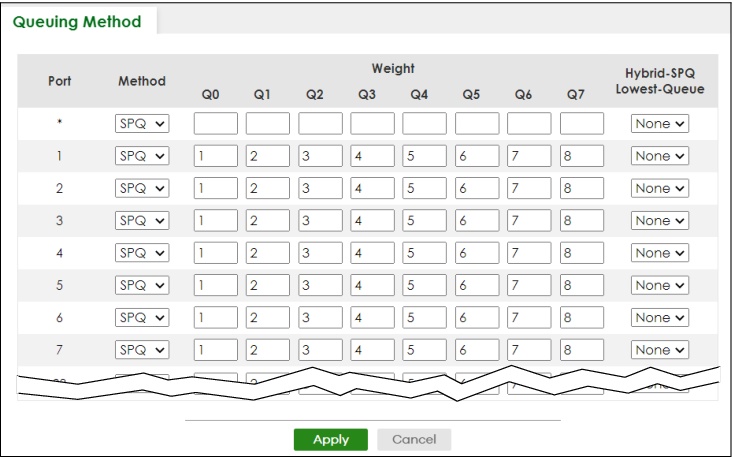
The following table describes the labels in this screen.
label | Description |
|---|---|
Port | This label shows the port you are configuring. |
* | Settings in this row apply to all ports. Use this row only if you want to make some settings the same for all ports. Use this row first to set the common settings and then make adjustments on a port-by-port basis.  Changes in this row are copied to all the ports as soon as you make them. Changes in this row are copied to all the ports as soon as you make them. |
Method | Select SPQ (Strictly Priority Queuing), WFQ (Weighted Fair Queuing) or WRR (Weighted Round Robin). Strictly Priority Queuing services queues based on priority only. When the highest priority queue empties, traffic on the next highest-priority queue begins. Q7 has the highest priority and Q0 the lowest. Weighted Fair Queuing is used to guarantee each queue's minimum bandwidth based on their bandwidth portion (weight) (the number you configure in the Weight field). Queues with larger weights get more guaranteed bandwidth than queues with smaller weights. Weighted Round Robin Scheduling services queues on a rotating basis based on their queue weight (the number you configure in the queue Weight field). Queues with larger weights get more service than queues with smaller weights. |
Weight | When you select WFQ or WRR, enter the queue weight here. Bandwidth is divided across the different traffic queues according to their weights. |
Hybrid-SPQ Lowest-Queue | This field is applicable only when you select WFQ or WRR. Select a queue (Q0 to Q7) to have the Switch use SPQ to service the subsequent queues after and including the specified queue for the port. For example, if you select Q5, the Switch services traffic on Q5, Q6 and Q7 using SPQ. Select None to always use WFQ or WRR for the port. |
Apply | Click Apply to save your changes to the Switch’s run-time memory. The Switch loses these changes if it is turned off or loses power, so use the Save link on the top navigation panel to save your changes to the non-volatile memory when you are done configuring. |
Cancel | Click Cancel to begin configuring this screen afresh. |